Windows + Android
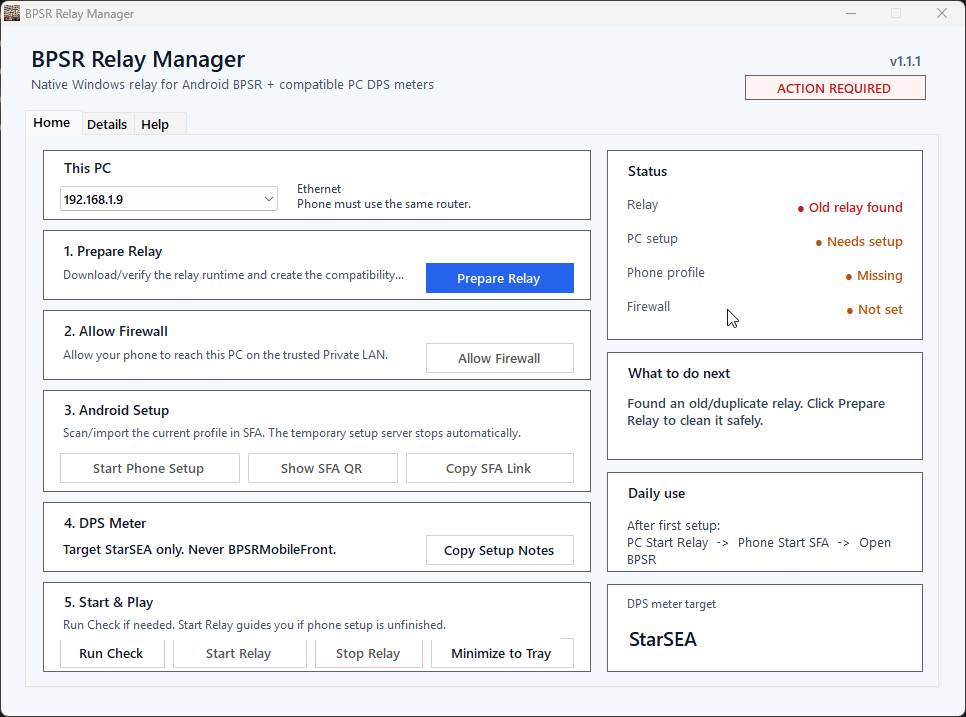
BPSR Android DPSMeter Relay
Connect your phone to a compatible Windows combat meter over your trusted home network while playing BPSR on Android.
What it does
- Guided phone setup with a QR profile for SFA (sing-box for Android).
- Works with compatible meters that parse BPSR traffic from the StarSEA process.
- Separate Home, Details and Help views for setup and troubleshooting.
Quick start
- Extract the complete release ZIP and open BPSR Relay Manager.exe on your PC.
- Choose the PC's LAN address. Select Prepare Relay, Allow Firewall and Start Phone Setup. Import the profile into SFA and route BPSR only.
- Start Relay on the PC, start SFA on your phone and open BPSR. Select StarSEA in your PC DPS meter.